
Creating an HLD Diagram in DevScribe
A High-Level Design (HLD) diagram gives you a visual overview of a system’s architecture. Instead of describing every implementation detail, it shows the major components of the system and how they communicate.
With Diagramly in DevScribe, you can create these architecture diagrams and keep them alongside the rest of your project documentation.
Why Create an HLD Diagram?
An HLD diagram makes it easier to understand a system before getting into the details.
It is useful for:
- Planning the architecture of a new application
- Documenting an existing system
- Explaining a system to teammates or stakeholders
- Visualizing how services interact
- Reviewing architecture before implementation
Creating an HLD Diagram
Open Diagramly in DevScribe and create a new diagram.
For this example, we’ll create a simple architecture for an e-commerce application.
Start by adding components for:
- Users: the clients interacting with the application
- Load Balancer: distributes incoming requests
- API Server: handles application requests
- Cache: stores frequently accessed data
- Database: stores application data
Arrange the components to establish a clear flow through the system.
Connecting the Architecture
Once the components are in place, connect them to represent how requests move through the application.
The main request path is:
Users
Load Balancer
API Server
The API server then communicates with the supporting services:
API Server to Cache
API Server to Database
The resulting diagram gives you a simple overview of how users reach the application and how the backend interacts with its data and caching layers.
Organizing the Diagram
As you add components, organize them so the architecture can be understood at a glance.
A simple top-to-bottom layout works well for this example:
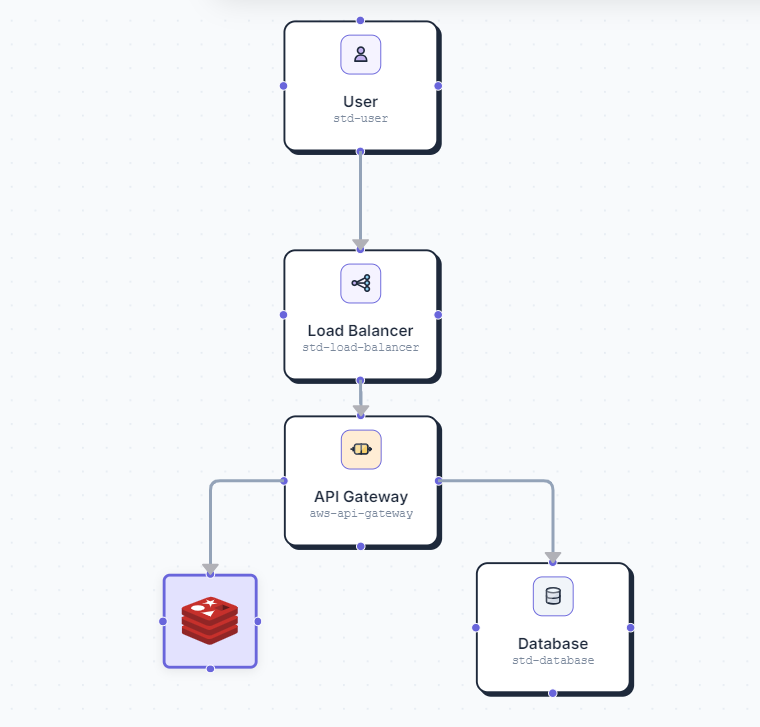
DevScribe provides tools for moving, resizing, connecting, grouping, and arranging components, so the diagram can remain readable as the architecture becomes more complex.
Adding the Architecture to Your Documentation
An architecture diagram is most useful when it is available alongside the documentation that explains the system.
In DevScribe, you can keep your HLD together with project notes, API documentation, database information, and other technical resources.
This gives developers both the visual overview and the detailed documentation they need without maintaining them separately.
When to Use an HLD Diagram
Create an HLD diagram when you need to:
- Plan a new system
- Document an existing architecture
- Introduce developers to a project
- Review the structure of an application
- Communicate architectural decisions
Exporting a Diagram
When your HLD is ready, use the Export option to save the diagram in a format that can be used outside DevScribe.
You can export it as an impage(png), as a gif, or as a devscribe file.
This is useful when you need to:
- Add the architecture to a presentation
- Share it with teammates
- Include it in a project report
- Keep a standalone copy of the architecture
Conclusion
An HLD diagram turns a system’s architecture into something that can be understood at a glance.
With Diagramly in DevScribe, you can build the architecture visually, organize its components, and keep the resulting diagram with the rest of your project documentation.
Design the architecture. Document the system. Keep it together in DevScribe.
