
REST API Testing
The API Plugin provides everything you need to test and document REST APIs in a single workspace. Instead of switching between multiple tools for API testing and documentation, you can create requests, execute them, inspect responses, and keep everything alongside your project documentation.
The REST API editor supports all common HTTP methods and provides dedicated editors for query parameters, headers, authorization, cookies, and request bodies. It also includes a built-in cURL editor, allowing you to paste, edit, and execute cURL commands without leaving the application.
Supported HTTP Methods
The REST API editor supports all commonly used HTTP methods.
- GET
- POST
- PUT
- PATCH
- DELETE
- HEAD
- OPTIONS
Select the required method from the dropdown before executing the request.
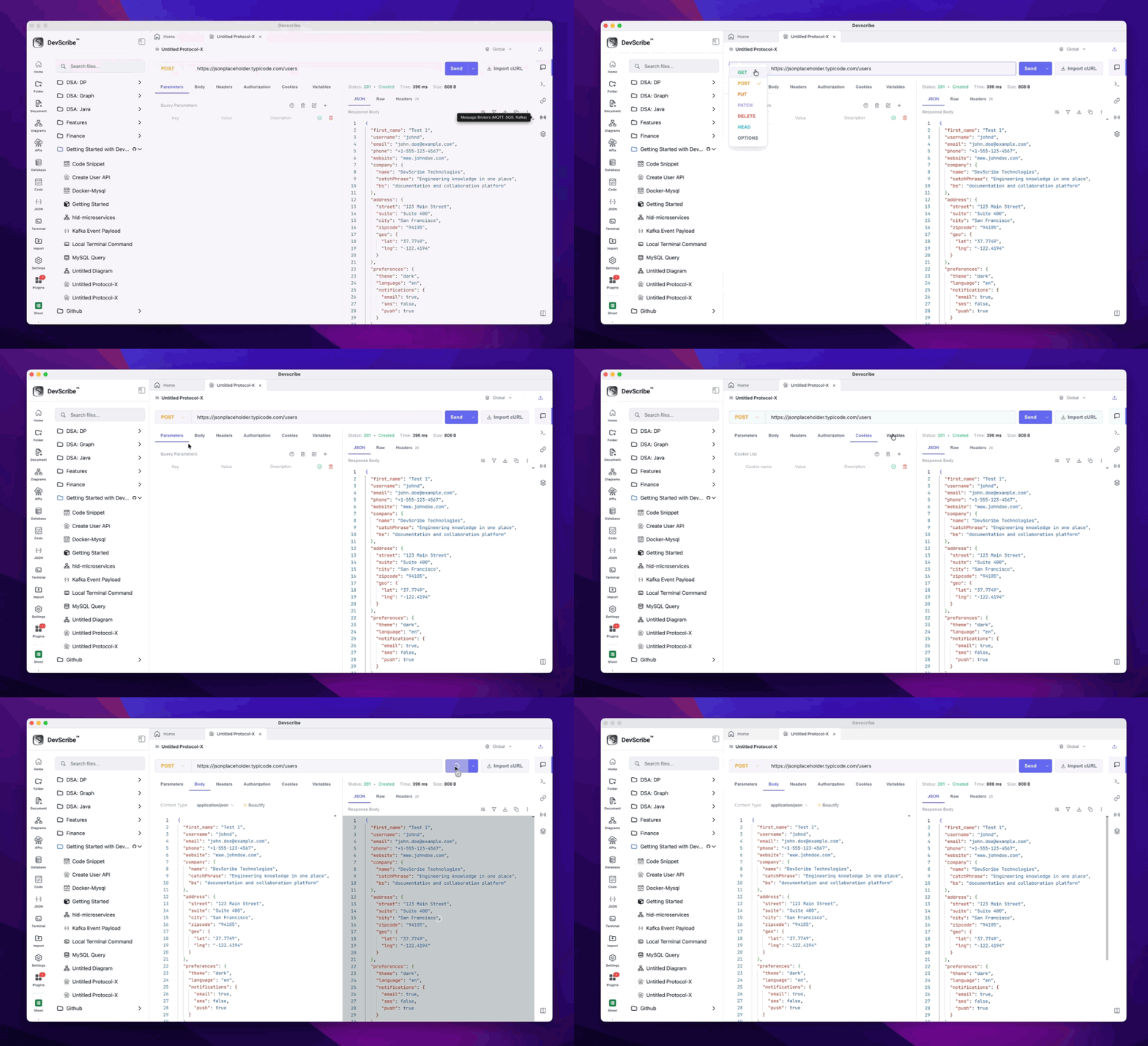
Request URL
Enter the endpoint URL you want to test.
The URL field supports both HTTP and HTTPS endpoints and can be updated at any time before running the request.
Query Parameters
Query parameters can be managed using the built-in parameter editor instead of manually editing the URL.
Each parameter includes:
- Key
- Value
- Enable or Disable
Disabled parameters are ignored during execution, making it easy to test different request variations.
Headers
Request headers allow you to send additional information with your API request.
Common examples include:
- Content-Type
- Accept
- Authorization
- User-Agent
- Custom Headers
Headers can be added, edited, enabled, or removed at any time.
Authorization
Configure authentication directly within the request editor.
Supported authentication methods include:
- No Authentication
- Basic Authentication
- Bearer Token
- API Key
- OAuth 2.0
Authentication settings are stored with the request, making it easy to test secured endpoints without repeatedly entering credentials.
Cookies
Cookies can be added directly to the request for testing authenticated sessions and browser-based applications.
Each cookie consists of:
- Name
- Value
Cookies can be modified or removed whenever required.
Request Body
For requests that require a payload, the API Plugin supports multiple body formats.
Supported body types include:
- JSON
- Form Data
- URL Encoded
- Raw Text
- XML
The built-in editor provides syntax highlighting for supported formats, making large payloads easier to read and modify.
Response Viewer
After executing a request, the Response Viewer displays all response details in one place.
The response includes:
- HTTP Status
- Response Time
- Response Headers
- Response Body
JSON responses are automatically formatted to improve readability.
Built-in cURL Editor
Many API examples are shared as cURL commands.
Instead of manually recreating them, simply paste the cURL command into the built-in cURL Editor.
The editor automatically extracts:
- HTTP Method
- Request URL
- Query Parameters
- Headers
- Cookies
- Request Body
Once imported, every part of the request remains fully editable. You can modify the request, execute it, and save it without working directly with long terminal commands.
Testing Your API
Once your request is configured, click Run to execute it.
The API Plugin sends the request and immediately displays the complete response, allowing you to verify request parameters, inspect returned data, debug errors, and iterate quickly without leaving your documentation workspace.
