
Exporting Resources in DevScribe
Not every project resource needs to be exported in the same way.
You might want an architecture diagram as an image, database data as CSV, or the original DevScribe resource so you can continue working on it later.
DevScribe provides different export formats depending on the resource you’re working with.
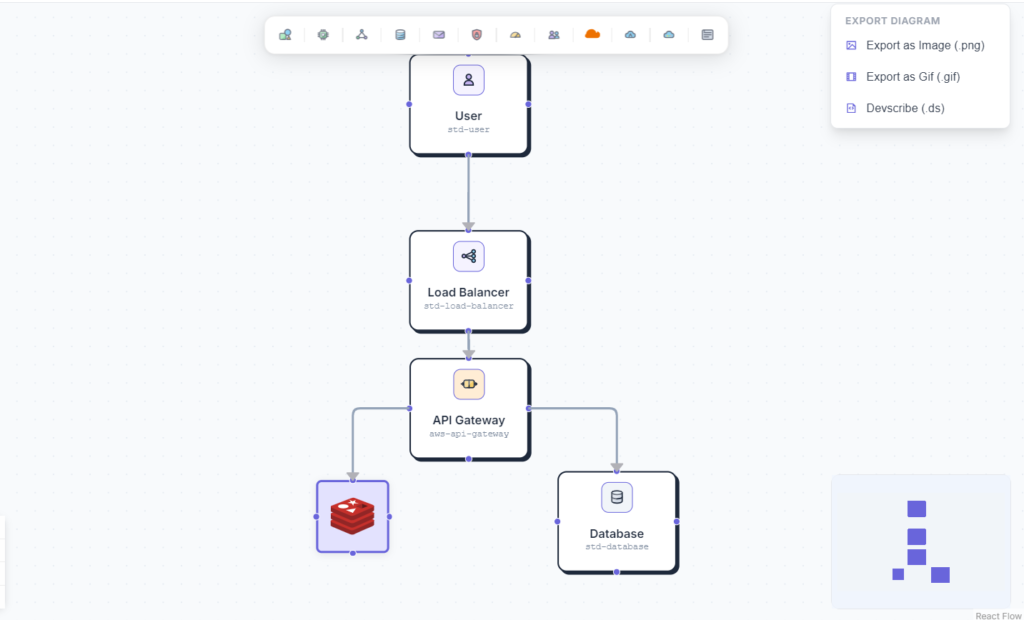
Exporting an HLD Diagram
An HLD diagram can be useful in a lot of places, project documentation, presentations, design discussions, or as part of another workspace.
In DevScribe, an HLD diagram can be exported as:
- Image
- GIF
- DevScribe file
Image
Use the Image export when you need a static version of the diagram.
For example, you can add the exported diagram to project documentation, a presentation, or share it separately from DevScribe.
GIF
The diagram can also be exported as a GIF.
This gives you another way to share the diagram when a visual or animated representation works better than a static image.
DevScribe File
If you want to keep working on the diagram in DevScribe, export it as a DevScribe file.
Unlike an image, the DevScribe version is intended to keep the resource within the DevScribe workflow so it can be used again later.
Exporting Database Tables
When working with a database, you may not always need to export the entire database. Sometimes you just need the contents of a particular table.
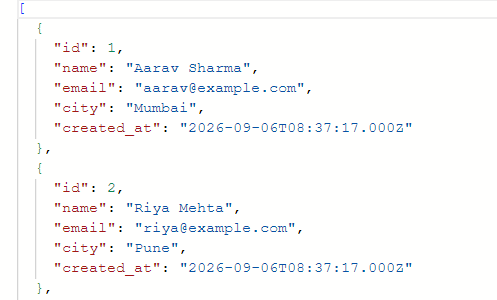
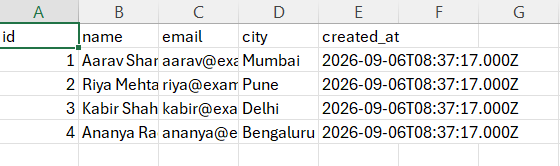
DevScribe lets you export a database table as:
- JSON
- CSV
JSON
The JSON option is useful when you need the table data in a structured format that can be used with applications, APIs, or other development tools.
CSV
The CSV option is useful when you want the table data in a simple tabular format.
For example, a users table exported as CSV can be opened in a spreadsheet application or processed by another tool.
Exporting a Database File
A database file can be exported in more formats than an individual table.
The available options are:
- JSON
- CSV
- DevScribe file
JSON and CSV
Use JSON or CSV when you want to take the database data outside of DevScribe.
These formats are useful when the exported data needs to be consumed or processed elsewhere.
DevScribe File
Choose DevScribe file when you want to keep the database resource in a format that can be used again in DevScribe.
This is different from exporting the data as JSON or CSV: you’re keeping the resource in the DevScribe format rather than converting it into a general-purpose data format.
Which Export Format Should You Use?
It mostly comes down to what you want to do with the exported resource.
| Resource | Available formats | Typical use |
|---|---|---|
| HLD diagram | Image, GIF, DevScribe file | Documentation, sharing, continued work |
| Database table | JSON, CSV | Data exchange, spreadsheets, processing |
| Database file | JSON, CSV, DevScribe file | Data exchange or continued DevScribe use |
Exporting a Collection
Sometimes you don’t want to export resources one at a time.
If several resources belong to the same project, you can organize them into a DevScribe Collection and export the collection as a .dscollection file.
For example, a project collection could contain:
- Project documentation
- HLD diagram
- API requests
- Database queries
- Database resources
- Code files
This is useful when the goal is to share the project context as a whole, rather than individual resources.
For a detailed look at collections, see Shareable Collections in DevScribe.
Conclusion
DevScribe gives you different ways to export your project resources depending on what you need.
An HLD diagram can be exported as an image, GIF, or DevScribe file. A database table can be exported as JSON or CSV, while a database file can be exported as JSON, CSV, or a DevScribe file.
And when you’re working with multiple related resources, you can bring them together in a collection and export the entire collection as a .dscollection file.
That means you can export exactly what you need, a visual, data, an individual DevScribe resource, or an entire project collection.
Here’s a walkthrough :
