If you’re a developer, chances are you’ve tried Obsidian.
It’s fast, offline-first, Markdown-based, and excellent for building a personal knowledge base. Many developers use it as a “second brain” to store ideas, meeting notes, and architectural thoughts.
But after using Obsidian for a while, a limitation becomes obvious:
Obsidian is great for writing about engineering — not for doing engineering.
That’s where DevScribe comes in.
Obsidian: Excellent Notes, Limited Execution
Let’s be clear — Obsidian is a fantastic tool for what it’s designed to do.
It allows you to:
- Write clean Markdown notes stored locally
- Link ideas together with backlinks and graphs
- Extend functionality using plugins
- Stay fully offline with complete data ownership
For thinking, planning, and documenting ideas, Obsidian shines.
But when real development work begins — things start to break down.
The Developer Workflow Problem
A typical developer workflow today looks like this:
- Obsidian or Notion → documentation
- Postman → API testing
- DBeaver / DataGrip → database queries
- Draw.io / Excalidraw → diagrams
Each tool works well individually — but together, they create context switching hell.
Your API docs live in one place. Your database queries live somewhere else. Your diagrams are detached from both.
Obsidian doesn’t solve this problem — it simply documents it.
DevScribe: A Workspace Built for Engineering
DevScribe takes a fundamentally different approach.
Instead of being a note-taking app with plugins, DevScribe is an offline-first developer workspace where documentation, execution, and design live together.
You don’t just write about systems — you build and test them inside the same space.
Native Database Support (This Is the Game Changer)
DevScribe lets you write and execute real database queries directly inside your documentation.
Supported databases include:
- MySQL
- SQLite
- PostgreSQL
- MongoDB
- Elasticsearch
You can:
- Write queries next to explanations
- Save query results
- Document schema decisions
- Visualize database schemas
No external DB tools.
No copy-paste between apps.

This alone puts DevScribe in a completely different category from Obsidian.
Diagram Library Designed for Software Engineers
Obsidian’s Canvas is great for brainstorming and visual thinking — but DevScribe’s diagram library is purpose-built for system design.
DevScribe supports:
- ERD (Entity Relationship Diagrams)
- HLD (High-Level Design)
- LLD (Low-Level Design)
- UML class diagrams
- Sequence diagrams
- Data structure diagrams
These diagrams aren’t isolated visuals — they live next to:
- APIs
- Database schemas
- Implementation docs
Which makes them actually useful in real projects.

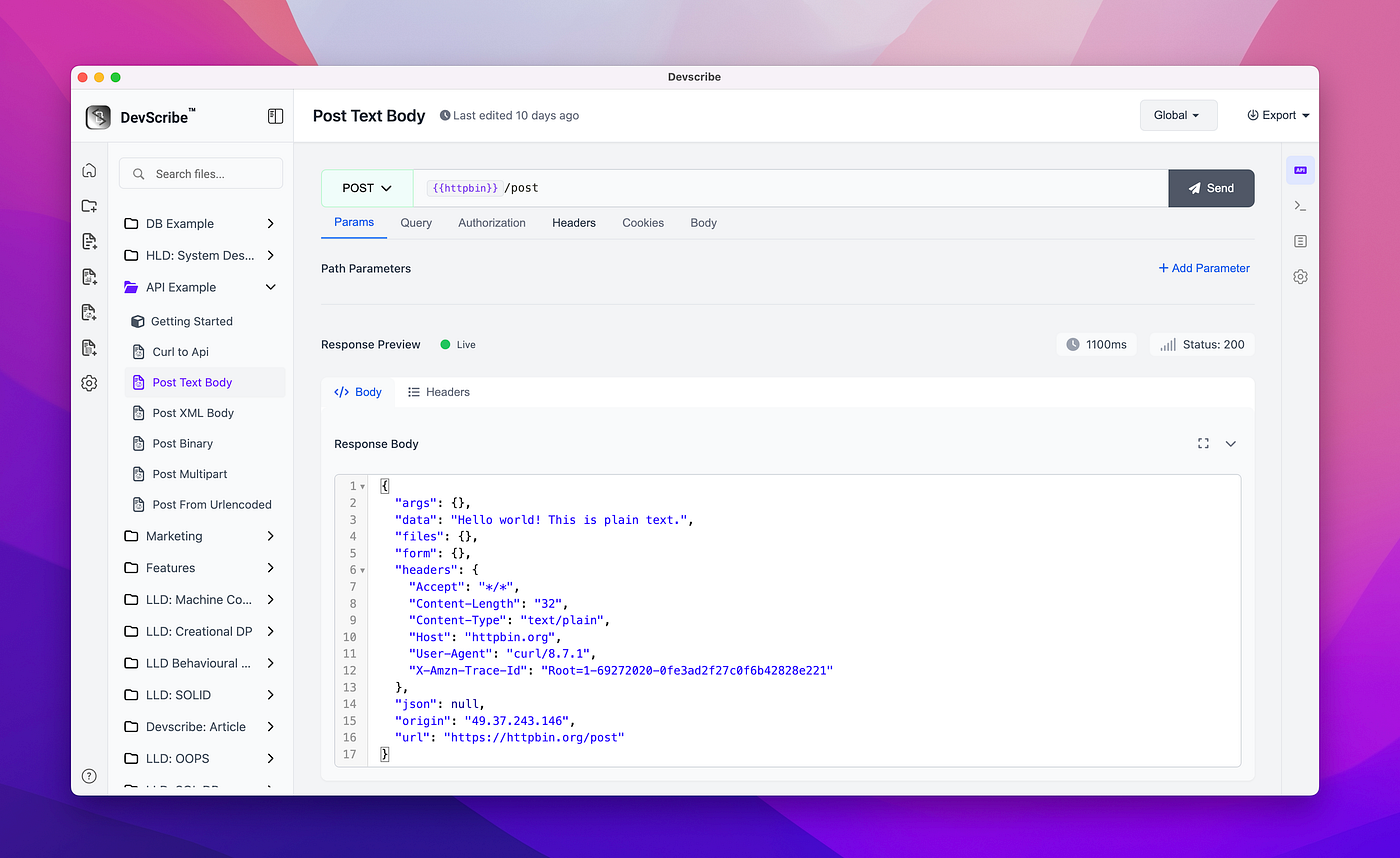
Postman-Like API Testing Inside Documentation
DevScribe also includes a Postman-style API testing interface.
You can:
- Define API requests
- Run and test APIs
- View responses
- Document endpoints — all in one place
Instead of switching between Postman and your docs, everything stays together.
Organized Like a Real Project, Not a Notebook
DevScribe understands how engineers actually work.
You can:
- Keep everything in one unified document, or
- Split work into multiple files:
- API definitions
- Documentation
- Diagrams
- Database queries & schemas
All of this lives inside a single project folder, just like a codebase.
This makes DevScribe ideal for:
- Long-term projects
- Onboarding new developers
- Architecture reviews
DevScribe vs Obsidian (Quick Comparison)
| Feature                         | DevScribe    | Obsidian |
| ------------------------------- | -----------  | -------- |
| Offline-first                   | ✅           | ✅        |
| Markdown writing                | ✅           | ✅        |
| Database query execution        | ✅           | ❌        |
| Schema visualization            | ✅           | ❌        |
| ERD / UML diagrams              | ✅           | ❌        |
| API testing                     | ✅           | ❌        |
| Plugin ecosystem                | ❌ (focused) | ✅        |
| Built for engineering workflows | ✅           | ❌        |
Obsidian is flexible.
DevScribe is integrated.
Who Should Use What?
Use Obsidian if:
- You want a personal knowledge base
- You mainly write notes and ideas
- You value plugins and customization
Use DevScribe if:
- You design systems
- You test APIs
- You write database queries
- You want documentation that actually executes
Final Thoughts
Obsidian is an excellent note-taking tool — but for developers, notes are only half the job.
Modern software development requires:
- Documentation
- Diagrams
- APIs
- Databases
- Execution
DevScribe brings all of that together in one offline workspace.
Documentation shouldn’t just explain systems —
it should be part of building them.